implement-feature
Guide for implementing features in ClaudeBar following architecture-first design, TDD, rich domain models, and Swift 6.2 patterns. Use this skill when: (1) Adding new functionality to the app (2) Creating domain models that follow user's mental model (3) Building SwiftUI views that consume domain models directly (4) User asks "how do I implement X" or "add feature Y" (5) Implementing any feature that spans Domain, Infrastructure, and App layers
Installation
Details
Usage
After installing, this skill will be available to your AI coding assistant.
Verify installation:
skills listSkill Instructions
name: implement-feature description: | Guide for implementing features in ClaudeBar following architecture-first design, TDD, rich domain models, and Swift 6.2 patterns. Use this skill when: (1) Adding new functionality to the app (2) Creating domain models that follow user's mental model (3) Building SwiftUI views that consume domain models directly (4) User asks "how do I implement X" or "add feature Y" (5) Implementing any feature that spans Domain, Infrastructure, and App layers
Implement Feature in ClaudeBar
Implement features using architecture-first design, TDD, rich domain models, and Swift 6.2 patterns.
Workflow Overview
┌─────────────────────────────────────────────────────────────┐
│  1. ARCHITECTURE DESIGN (Required - User Approval Needed)  │
├─────────────────────────────────────────────────────────────┤
│  • Analyze requirements                                     │
│  • Create component diagram                                 │
│  • Show data flow and interactions                          │
│  • Present to user for review                               │
│  • Wait for approval before proceeding                      │
└─────────────────────────────────────────────────────────────┘
                            │
                            ▼ (User Approves)
┌─────────────────────────────────────────────────────────────┐
│  2. TDD IMPLEMENTATION                                      │
├─────────────────────────────────────────────────────────────┤
│  • Domain model tests → Domain models                       │
│  • Infrastructure tests → Implementations                   │
│  • Integration and views                                    │
└─────────────────────────────────────────────────────────────┘
Phase 0: Architecture Design (MANDATORY)
Before writing any code, create an architecture diagram and get user approval.
Step 1: Analyze Requirements
Identify:
- What new models/types are needed
- Which existing components will be modified
- Data flow between components
- External dependencies (CLI, API, etc.)
Step 2: Create Architecture Diagram
Use ASCII diagram showing all components and their interactions:
Example: Adding a new AI provider

┌─────────────────────────────────────────────────────────────────────┐
│                           ARCHITECTURE                               │
├─────────────────────────────────────────────────────────────────────┤
│                                                                      │
│  ┌─────────────┐     ┌──────────────────┐     ┌──────────────────┐  │
│  │  External   │     │  Infrastructure  │     │     Domain       │  │
│  └─────────────┘     └──────────────────┘     └──────────────────┘  │
│                                                                      │
│  ┌─────────────┐     ┌──────────────────┐     ┌──────────────────┐  │
│  │  CLI Tool   │────▶│  NewUsageProbe   │────▶│  UsageSnapshot   │  │
│  │  (new-cli)  │     │  (implements     │     │  (existing)      │  │
│  └─────────────┘     │   UsageProbe)    │     └──────────────────┘  │
│                      └──────────────────┘              │             │
│                              │                         ▼             │
│                              │              ┌──────────────────┐     │
│                              │              │  NewProvider     │     │
│                              └─────────────▶│  (AIProvider)    │     │
│                                             └──────────────────┘     │
│                                                       │              │
│                                                       ▼              │
│                              ┌──────────────────────────────────┐   │
│                              │  App Layer                        │   │
│                              │  ┌────────────────────────────┐   │   │
│                              │  │ ClaudeBarApp.swift         │   │   │
│                              │  │ (register new provider)    │   │   │
│                              │  └────────────────────────────┘   │   │
│                              └──────────────────────────────────┘   │
└─────────────────────────────────────────────────────────────────────┘
Step 3: Document Component Interactions
List each component with:
- Purpose: What it does
- Inputs: What it receives
- Outputs: What it produces
- Dependencies: What it needs
Example:

| Component      | Purpose                | Inputs          | Outputs        | Dependencies    |
|----------------|------------------------|-----------------|----------------|-----------------|
| NewUsageProbe  | Fetch usage from CLI   | CLI command     | UsageSnapshot  | CLIExecutor     |
| NewProvider    | Manages probe lifecycle| UsageProbe      | snapshot state | UsageProbe      |
Step 4: Present for User Approval
IMPORTANT: Always ask user to review the architecture before implementing.
Use AskUserQuestion tool with options:
- "Approve - proceed with implementation"
- "Modify - I have feedback on the design"
Do NOT proceed to Phase 1 until user explicitly approves.
Core Principles
1. Rich Domain Models (User's Mental Model)
Domain models encapsulate behavior, not just data:
// Rich domain model with behavior
public struct UsageQuota: Sendable, Equatable {
    public let percentRemaining: Double

    // Domain behavior - computed from state
    public var status: QuotaStatus {
        QuotaStatus.from(percentRemaining: percentRemaining)
    }

    public var isDepleted: Bool { percentRemaining <= 0 }
    public var needsAttention: Bool { status.needsAttention }
}
2. Swift 6.2 Patterns (No ViewModel/AppState Layer)
Views consume domain models directly from QuotaMonitor:
// QuotaMonitor is the single source of truth
public actor QuotaMonitor {
    private let providers: AIProviders  // Hidden - use delegation methods

    // Delegation methods (nonisolated for UI access)
    public nonisolated var allProviders: [any AIProvider]
    public nonisolated var enabledProviders: [any AIProvider]
    public nonisolated func provider(for id: String) -> (any AIProvider)?
    public nonisolated func addProvider(_ provider: any AIProvider)
    public nonisolated func removeProvider(id: String)

    // Selection state
    public nonisolated var selectedProviderId: String
    public nonisolated var selectedProvider: (any AIProvider)?
    public nonisolated var selectedProviderStatus: QuotaStatus
}

// Views consume domain directly - NO AppState layer
struct MenuContentView: View {
    let monitor: QuotaMonitor  // Injected from app

    var body: some View {
        // Use delegation methods, not monitor.providers.enabled
        ForEach(monitor.enabledProviders, id: \.id) { provider in
            ProviderPill(provider: provider)
        }
    }
}
3. Protocol-Based DI with @Mockable
@Mockable
public protocol UsageProbe: Sendable {
    func probe() async throws -> UsageSnapshot
    func isAvailable() async -> Bool
}
Architecture
Full documentation: docs/ARCHITECTURE.md
| Layer | Location | Purpose |
|---|---|---|
| Domain | Sources/Domain/ | QuotaMonitor (single source of truth), rich models, protocols |
| Infrastructure | Sources/Infrastructure/ | Probes, storage, adapters |
| App | Sources/App/ | SwiftUI views consuming domain directly (no ViewModel) |
Key patterns:
- Repository Pattern with ISP - Provider-specific sub-protocols (
ZaiSettingsRepository,CopilotSettingsRepository) - Protocol-Based DI -
@Mockablefor testing - Chicago School TDD - Test state, not interactions
- No ViewModel layer - Views consume domain directly
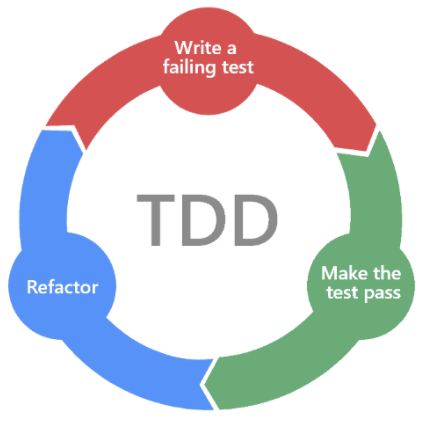
TDD Workflow (Chicago School)
We follow Chicago school TDD (state-based testing):
- Test state changes and return values, not interactions
- Focus on the "what" (observable outcomes), not the "how" (method calls)
- Mocks stub dependencies to return data, not to verify calls
- Design emerges from tests (emergent design)
Phase 1: Domain Model Tests
Test state and computed properties:
@Suite
struct FeatureModelTests {
    @Test func `model computes status from state`() {
        // Given - set up initial state
        let model = FeatureModel(value: 50)

        // When/Then - verify state/return value
        #expect(model.status == .normal)
    }

    @Test func `model state changes correctly`() {
        // Given
        var model = FeatureModel(value: 100)

        // When - perform action
        model.consume(30)

        // Then - verify new state
        #expect(model.value == 70)
        #expect(model.status == .healthy)
    }
}
Phase 2: Infrastructure Tests
Stub dependencies to return data, assert on resulting state:
@Suite
struct FeatureServiceTests {
    @Test func `service returns parsed data on success`() async throws {
        // Given - stub dependency to return data (not verify calls)
        let mockClient = MockNetworkClient()
        given(mockClient).fetch(any()).willReturn(validResponseData)

        let service = FeatureService(client: mockClient)

        // When
        let result = try await service.fetch()

        // Then - verify returned state, not interactions
        #expect(result.items.count == 3)
        #expect(result.status == .loaded)
    }
}
Phase 3: Integration
Wire up in ClaudeBarApp.swift and create views.
References
- Architecture diagram patterns - ASCII diagram examples for different scenarios
- Swift 6.2 @Observable patterns
- Rich domain model patterns
- TDD test patterns
Checklist
Architecture Design (Phase 0)
- Analyze requirements and identify components
- Create ASCII architecture diagram with component interactions
- Document component table (purpose, inputs, outputs, dependencies)
- Get user approval before proceeding
Implementation (Phases 1-3) - Chicago School TDD
- Write failing test asserting expected STATE (Red)
- Write minimal code to pass the test (Green)
- Refactor while keeping tests green
- Define domain models in
Sources/Domain/with behavior - Test state changes and return values (not interactions)
- Define protocols with
@Mockablefor external dependencies - Stub mocks to return data, assert on resulting state
- Implement infrastructure in
Sources/Infrastructure/ - Create views consuming domain models directly
- Run
swift testto verify all tests pass
More by tddworks
View allGuide for adding new AI providers to ClaudeBar using TDD patterns. Use this skill when: (1) Adding a new AI assistant provider (like Antigravity, Cursor, etc.) (2) Creating a usage probe for a CLI tool or local API (3) Following TDD to implement provider integration (4) User asks "how do I add a new provider" or "create a provider for X"
Guide for making improvements to existing ClaudeBar functionality using TDD. Use this skill when: (1) Enhancing existing features (not adding new ones) (2) Improving UX, performance, or code quality (3) User asks "improve X", "make Y better", or "enhance Z" (4) Small enhancements that don't require full architecture design For NEW features, use implement-feature skill instead.
Guide for fixing bugs in ClaudeBar following Chicago School TDD and rich domain design. Use this skill when: (1) User reports a bug or unexpected behavior (2) Fixing a defect in existing functionality (3) User asks "fix this bug" or "this doesn't work correctly" (4) Correcting behavior that violates the user's mental model
Guide for implementing features following architecture-first design, TDD, rich domain models, and Swift 6.2 patterns. Use this skill when: (1) Adding new functionality to a Swift app (2) Creating domain models that follow user's mental model (3) Building SwiftUI views that consume domain models directly (4) User asks "how do I implement X" or "add feature Y" (5) Implementing any feature that spans Domain, Infrastructure, and App layers